
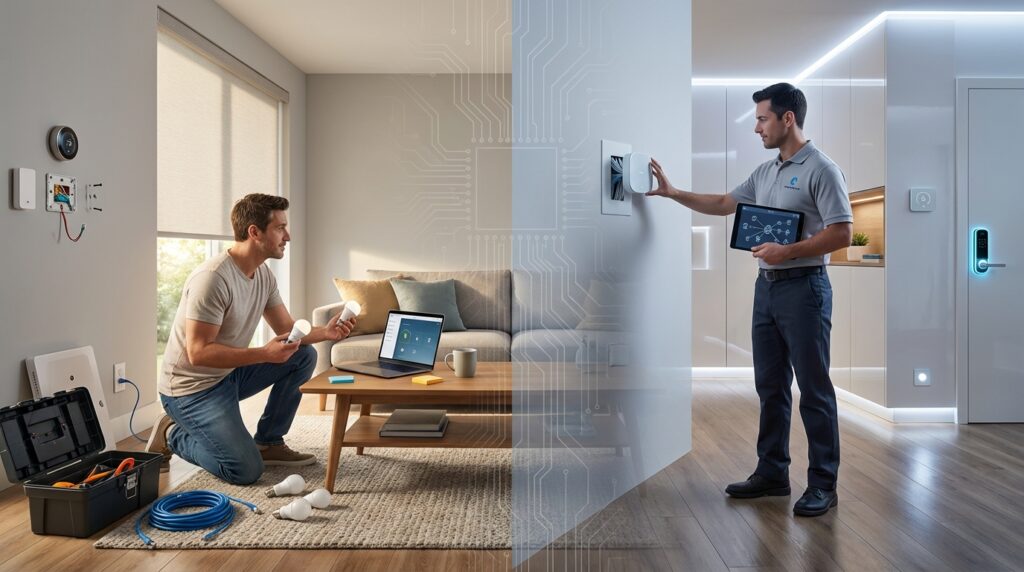
Welcome to your guide on creating an automated living space! More people than ever are embracing this technology. In 2024, there are over 378 million users globally.
This growth shows a real shift in how we interact with our houses. The decision on how to set up your devices is a big one. It impacts your daily experience, comfort, and even your security.
Are you a hands-on person who loves a good project? Or do you prefer the assurance of an expert’s touch? This article will walk you through the core differences between doing it yourself and hiring a pro.
We will cover everything from budget and technical comfort to the long-term upkeep of your setup. Our goal is to give you a clear, friendly comparison. This will help you make the best choice for your needs.
You can control your lights, thermostat, and locks from your phone. This creates a more convenient and energy-efficient way of living. Whether you’re tech-savvy or new to automation, this process is more accessible than you might think.
For a deeper look at the factors involved, explore our resource on constructing your automated living space.
Key Takeaways
- The popularity of automated home technology is rapidly growing, with millions of new users each year.
- Your choice between DIY and professional setup significantly affects your daily comfort and system reliability.
- Key decision factors include your budget, technical skill level, and the complexity of the automation you want.
- Modern systems offer significant benefits, like remote control of appliances and enhanced energy efficiency.
- This guide is designed to be helpful for everyone, from beginners to experienced tech enthusiasts.
- Proper planning is essential for a successful and satisfying experience with your new devices.
Understanding Smart Home Installation Basics
The foundation of any connected house lies in its core components and how they interact. Knowing these basics helps you make informed decisions about your setup approach.
Key Components and Devices
Modern automated residences rely on specific technologies working together. Essential pieces include lighting controls, security cameras, climate regulators, and audio speakers.
These gadgets form the building blocks of your connected environment. Each serves a distinct purpose while contributing to the overall experience.
| Device Type | Primary Function | Popular Examples |
|---|---|---|
| Lighting Controls | Adjust brightness and color remotely | Philips Hue, LIFX |
| Security Cameras | Monitor property and record activity | Ring, Arlo, Nest Cam |
| Climate Regulators | Manage temperature efficiently | Ecobee, Nest Thermostat |
| Voice Assistants | Provide hands-free control | Amazon Echo, Google Nest |
How Smart Systems Work Together
A central controller acts as the brain coordinating all your gadgets. Popular options include Google Home, Amazon Alexa, and Samsung SmartThings.
These platforms use Wi-Fi networks and mobile applications to create seamless connections. You can manage everything from your phone or using voice commands.
Understanding this technology foundation prepares you for successful setup. It reveals whether you feel comfortable handling the process yourself.
DIY Smart Home Installation: Planning and Execution
Embarking on a do-it-yourself automation project requires careful consideration of your household’s unique requirements. Proper planning prevents compatibility headaches later.
Assessing Your Home’s Needs
Start by evaluating which rooms need automation. Consider your primary goals like security or energy savings.
Check your existing gadgets. See if current TVs or speakers can connect to a central hub. This saves money on new purchases.
Choose your connection type wisely. Most devices use Wi-Fi, but some require Zigbee or Z-Wave protocols.
| Platform | Best For | Voice Assistant | Key Feature |
|---|---|---|---|
| Google Home | Android users | Google Assistant | Seamless Google integration |
| Amazon Alexa | Broad compatibility | Alexa | Extensive skill library |
| Apple HomeKit | iOS ecosystem | Siri | Strong privacy focus |
Step-by-Step Setup Process
Follow manufacturer instructions for each device installation. Connect them to your Wi-Fi network using your credentials.
Download the required apps for control. Name your gadgets clearly, like “Living Room Lights.” This helps with voice commands.
Create automation routines that fit your lifestyle. Test each device before permanent mounting.
Avoid common mistakes like weak signals or mixing incompatible brands. Start with a few devices before expanding your system.
Common Challenges in DIY Setups
While DIY setups offer great flexibility, they often come with technical hurdles that can test your patience. Understanding these common issues helps you prepare better for your automation journey.
Connectivity and Compatibility Issues
Weak Wi-Fi signals cause frequent disconnections for gadgets far from your router. This disrupts your automated experience and requires constant troubleshooting.
Network congestion becomes problematic in apartment buildings. Multiple signals interfere with each other, affecting device reliability.
Router limitations are another concern. Most modern routers support many gadgets in theory. But performance often suffers well before reaching capacity limits.
Compatibility problems arise when mixing different brands. Not all devices communicate effectively with each other. Some require specific hubs or bridges to function properly.
Software-related issues include outdated firmware causing bugs or safety concerns. Regular updates are essential for smooth operation.
Setup failures occur when gadgets don’t respond during installation. This often relates to Wi-Fi band requirements. Many devices need your phone connected to the same 2.4 GHz network.
Upgrading to a mesh Wi-Fi system provides better coverage. Researching compatibility before purchase prevents headaches. Establishing a regular update schedule keeps everything running smoothly.
smart home installation: When to Consider Professional Help
Sometimes the do-it-yourself approach hits a wall. Knowing when to call in the experts can save you time and frustration.
Identifying Setup Pitfalls
Repeated connection problems signal it’s time for professional help. Electrical wiring modifications always require expert attention.
Whole-house automation needs careful planning. Security system integration often benefits from professional service.
Benefits of Expert Support
Professional smart home installation ensures everything works perfectly from day one. Experts handle complex wiring safely.
They customize your system to match your daily routine. Ongoing support provides peace of mind for future upgrades.
| Aspect | DIY Approach | Professional Service | Best For |
|---|---|---|---|
| Time Investment | Days or weeks | Few hours | Busy homeowners |
| Technical Complexity | Basic setups only | Whole-house systems | Complex projects |
| Safety Assurance | Self-verified | Code-compliant | Electrical work |
| Long-term Support | Self-troubleshooting | Professional maintenance | Peace of mind |
The right professional services transform a frustrating process into a smooth experience. Your home deserves reliable automation from the first step.
Comparing Costs and Benefits
The true value of your connected living space is measured in both dollars and daily convenience. This financial comparison helps you see beyond initial prices to long-term worth.
Professional service costs fall into clear tiers. Basic setup for simple devices runs $150-$400. Mid-range systems connecting multiple gadgets cost $500-$1,000. Full-house automation ranges from $2,000 to over $10,000.
Budget Considerations
DIY approaches save money upfront but demand your time. You must buy devices and possibly extra equipment like Wi-Fi boosters. Hidden costs include learning curves and potential mistakes.
Professional installation costs are higher initially. But they prevent errors and ensure reliability from day one. You’re paying for expertise and time savings.
Pros and Cons Analysis
DIY offers lower costs and full control. You learn valuable skills and can expand gradually. The downsides? Time-consuming setup and technical challenges.
Professional service provides expert configuration and guaranteed compatibility. You get custom design and ongoing support. The trade-off is less hands-on involvement.
The best choice depends on your budget, technical comfort, and needs. Tech-savvy individuals with simple requirements often succeed with DIY. Those wanting whole-house solutions usually benefit from professional help.
Consider your available time and desire for a seamless experience. Both options can create an automated house that fits your lifestyle perfectly.
Choosing the Right Smart Home Ecosystem and Devices
Selecting the right platform is perhaps the most crucial decision in building your connected environment. This choice affects everything from device compatibility to your daily experience.
Exploring Popular Platforms
Three main ecosystems dominate the market. Google Home integrates seamlessly with Android devices and offers conversational voice commands. Amazon Alexa boasts the widest range of compatible products. Apple HomeKit provides strong security for iPhone users but has more limited options.
Alternative platforms include Samsung SmartThings for flexibility and Home Assistant for tech enthusiasts wanting local control.
Selecting Compatible Gadgets and Hubs
Always check for “Works with” logos before purchasing devices. Your central hub coordinates communication between all your gadgets using various protocols.
Choose specific devices like lights for customizable illumination and cameras for security monitoring. Make sure all selections work within your chosen ecosystem.
Integrating Voice Control and Automation
Voice assistants enable hands-free operation through natural language commands. You can create automation routines that trigger multiple actions based on schedules or conditions.
New standards like Matter and Thread help devices from different brands work together seamlessly. This reduces compatibility concerns that have historically complicated setup.
Consider your existing technology and future expansion needs when selecting your platform. Proper planning ensures a smooth, integrated experience.
Tips for Troubleshooting, Maintenance, and Future Upgrades
Regular maintenance is key to ensuring your connected devices work reliably day after day. A few simple habits can prevent most common technical issues.
Solving Common Technical Issues
When gadgets stop responding, start with basic checks. Verify your smartphone connects to the same Wi-Fi network as your devices. Most need the 2.4 GHz band for proper setup.
Restarting devices often resolves temporary glitches. If setup fails, repeat the process carefully. Some gadgets hang during initial configuration.
Keep your network strong and secure. Place your router centrally or use mesh systems for larger spaces. Change default passwords and enable two-factor authentication.
| Maintenance Task | Frequency | Key Benefit | Tools Needed |
|---|---|---|---|
| Software Updates | Monthly | Security patches & bug fixes | Manufacturer app |
| Battery Checks | Quarterly | Prevent connection drops | Spare batteries |
| Network Security | Annually | Protect personal data | Strong passwords |
| Device Organization | As needed | Easy voice control | Clear naming system |
For future expansion, check compatibility before buying new gadgets. Matter-certified technology offers better interoperability between brands.
Energy-efficient choices like LED lighting and smart thermostats save money over time. These upgrades make your space more sustainable.
Conclusion
Building your automated living space represents a personal journey that balances convenience with customization. The right choice between DIY and professional approaches depends on your budget, technical comfort, and specific requirements.
Successful planning is your most valuable investment. Assess your needs carefully and choose compatible gadgets that work together seamlessly. This ensures your system grows with your lifestyle over the years.
Remember that this technology offers more than just remote control. It enhances security through cameras, saves energy with efficient lighting, and creates a comfortable environment through voice commands. Both options can deliver excellent results when approached thoughtfully.
Start with your most important priorities and expand gradually. With proper planning and the right devices, you’ll create a space that serves your family reliably for years to come.