
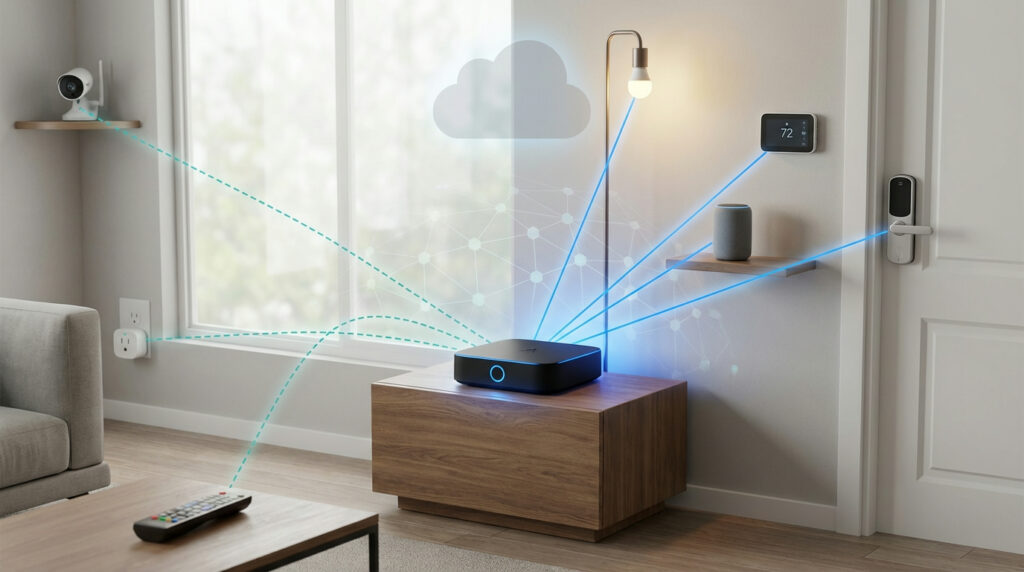
Many people building a connected home face the same question today. With the new universal standard promising seamless integration, do you really need that extra piece of hardware? The expectation is that everything should connect instantly.
Reality often looks different. You might experience app updates, connectivity problems, or gadgets not showing up correctly. This gap between promise and practice is where the true role of a central controller becomes clear.
While the new protocol creates a common language for your gadgets, a dedicated unit offers significant advantages. It links older, non-compatible products to your system. It maintains local control for faster responses and better privacy. It also enables complex automations that go beyond basic routines.
This guide will walk you through everything from basic concepts to specific product recommendations. We cover setup instructions and optimization strategies to build a reliable connected home ecosystem that works for you.
Key Takeaways
- The universal standard simplifies connectivity but doesn’t eliminate all integration challenges
- Dedicated controllers bridge the gap between new and legacy home automation products
- Local processing through a central unit ensures faster response times and enhanced privacy
- Advanced automation capabilities often require the processing power of a dedicated device
- Choosing the right controller depends on your existing ecosystem and future expansion plans
- Proper setup is crucial for achieving the promised seamless experience
- Investment in the right hardware now can prevent compatibility issues later
Introduction to Matter and Smart Home Evolution
Building a connected home used to feel like assembling a puzzle with pieces from different boxes. You might have a Wi-Fi bulb, a Zigbee sensor, and a Z-Wave lock, each needing its own app and bridge. This fragmentation created real frustration for consumers who just wanted everything to work together seamlessly.
In response, the biggest names in tech—Apple, Google, Amazon, and Samsung—joined forces. Their goal was to create a single, universal language for the Internet of Things. This collaboration resulted in a new, open standard designed to end the compatibility wars.
The core promise is powerful: eliminate the need for multiple proprietary apps and bridges. This standard allows products from any brand to communicate directly with each other. It’s a significant shift from closed systems to an open ecosystem that prioritizes your choice.
This new approach brings key benefits like enhanced security through local processing and improved reliability. It offers greater flexibility, letting you pick the best devices without worrying about brand loyalty. For those starting your first smart home setup, it simplifies the entire process.
While this new protocol is a giant leap forward, it works alongside existing technologies. This transitional period means understanding the role of central controllers is still valuable for a robust and advanced automated home.
What is Matter? Understanding the New Smart Home Standard
Imagine walking into a store and knowing any connected gadget will work seamlessly with your existing setup. This is the promise behind the new universal standard that’s transforming home automation.
Matter Interoperability and Universal Connectivity
The protocol acts as a common language for your gadgets. It lets products from different brands communicate directly with each other.
You can mix and match devices based on features and price. Brand loyalty becomes less important than finding the right product for your needs.
This standard uses two main wireless technologies to connect devices:
| Protocol | Best For | Key Feature | Power Usage |
|---|---|---|---|
| Thread | Sensors, lights, switches | Self-healing mesh network | Very low |
| Wi-Fi | Cameras, displays, appliances | High bandwidth | Moderate to high |
Enhancing Security and Local Control
Your privacy gets a significant boost with this approach. Commands process locally within your home network instead of traveling to cloud servers.
This means faster response times for your automations. Your system keeps working even during internet outages.
The encryption standards ensure your data stays protected. Over 40 device types now support this technology, covering most smart home categories.
Essential Matter Hubs: Benefits and Key Functions
The debate around whether you need additional hardware continues. But the practical benefits of a dedicated controller are becoming increasingly clear for most setups.
These central units serve dual roles in modern smart homes. They act as controllers that manage your ecosystem and often function as Thread Border Routers.
Boosting Device Communication and Reliability
A dedicated controller significantly improves your system’s performance. It processes commands locally for faster response times.
This approach reduces network congestion by managing traffic efficiently. Your automation rules execute instantly without cloud delays.
| Feature | Basic Connectivity | With Dedicated Controller | Impact |
|---|---|---|---|
| Response Time | Cloud-dependent | Local processing | 2-3x faster |
| Internet Outage | System fails | Continues working | Full reliability |
| Network Traffic | High congestion | Optimized routing | Smoother operation |
| Thread Support | Limited | Full mesh network | Extended range |
Integrating Legacy and New Smart Devices
One major advantage is bridging older technology into your new system. This protects your existing investment in smart home gear.
Devices using Zigbee or proprietary protocols can join your unified ecosystem. They appear alongside newer compatible products in your control app.
“The true value of a centralized controller emerges when you need to maintain continuity between generations of technology. It’s the bridge that future-proofs your investment.”
This integration capability means your older Philips Hue lights or Aqara sensors work seamlessly. You create one cohesive smart home experience without replacing functional equipment.
Key Features to Look For Before Buying
When selecting a smart home controller, understanding the essential features can make the difference between frustration and seamless automation. Your choice today will impact your system’s performance for years.
Ecosystem Compatibility and Supported Platforms
Check if the controller works with your preferred platform. Apple Home, Google Home, and Amazon Alexa each have unique requirements. This ensures smooth setup and full feature access.
Verify the companion app’s functionality before purchasing. Some apps offer advanced automation options that others lack. Your primary ecosystem should guide your choice.
Thread Support, Local Automation, and Privacy
A Thread Border Router capability is essential for connecting modern devices. This creates a self-healing mesh network that extends your system’s range reliably.
Local processing protects your privacy and ensures operations continue during internet outages. Cloud-dependent systems may compromise your security and responsiveness.
| Feature | Basic Controller | Advanced Controller | Benefit |
|---|---|---|---|
| Local Processing | Limited | Full automation | Works offline |
| Thread Support | None | Border Router | Extended range |
| Privacy Control | Cloud-based | Local storage | Enhanced security |
| Platform Support | Single ecosystem | Multiple options | Flexible setup |
Additional Smart Features and Upgrade Paths
Some controllers include built-in cameras, speakers, or environmental sensors. These integrated features can reduce your need for separate devices.
“The best smart home controller grows with your needs, offering regular updates and support for emerging technologies.”
Consider the manufacturer’s update history and commitment to new protocols. A good buying guide emphasizes future-proofing your investment. Choose devices with proven track records for long-term satisfaction.
Top Matter Hub Options and Comparisons
Choosing the right central controller transforms your smart home from basic to brilliant. The best options offer unique strengths for different households and ecosystems.
Aqara Hub M3 and Camera Hub G5 Pro
The Aqara Hub M3 stands out with triple-protocol support. It handles Matter, Zigbee, and Thread simultaneously.
This versatility makes it perfect for mixed-device homes. The built-in speaker and IR blaster extend control to traditional appliances.
For added security, the Camera Hub G5 Pro combines camera functionality with hub capabilities. It offers local AI processing without cloud subscriptions.
Apple HomePod Mini, Google Nest Hub 2nd Gen, and Amazon Echo (4th Gen)
Apple’s HomePod Mini delivers seamless integration for iOS users. It serves as both a controller and Thread border router.
The Google Nest Hub 2nd Gen adds visual control through its smart display. You can view camera feeds and manage your entire Google Home ecosystem from one screen.
Amazon’s Echo 4th Gen offers vast compatibility with Alexa integration. It works with thousands of devices across multiple platforms.
Each option brings unique advantages to different smart home setups. Your choice depends on your existing devices and preferred ecosystem.
Setting Up Your Matter Hub: Easy Steps and Tips
Proper setup ensures your smart devices communicate effectively from day one. The installation process follows a similar pattern across different platforms.
First, connect your controller to power and download the appropriate companion application. Most systems guide you through the initial configuration automatically.
Quick Setup Guide for Popular Platforms
For Amazon Alexa users, plug in your Echo device and download the Alexa app. Tap the “+” icon and select “Add Device” to begin. Choose your Echo model and follow the on-screen instructions.
Adding compatible products involves scanning QR codes through the app’s “Add Device” menu. Select “Matter” when prompted and confirm you have a compatible product ready.
| Platform | Setup Time | QR Code Required | Network Check |
|---|---|---|---|
| Amazon Alexa | 5-10 minutes | Yes | 2.4GHz Wi-Fi |
| Apple Home | 3-7 minutes | Yes | Same network |
| Google Home | 5-8 minutes | Yes | Permissions needed |
| Samsung SmartThings | 6-12 minutes | Yes | Hub connection |
Troubleshooting Common Connectivity Issues
If devices don’t appear after scanning, check your Wi-Fi network. Many products only work on 2.4GHz networks, not 5GHz.
Keep devices close during pairing and ensure all firmware is updated. For Thread networks, verify your controller functions as a border router.
Platform-specific fixes include resetting Apple Home controllers or enabling Alexa skills. Google Home may require additional network permissions for full functionality.
Optimizing Your Smart Home Ecosystem
Creating a truly cohesive smart home requires thoughtful organization and strategic planning. Your system should work together seamlessly, enhancing daily life without adding complexity.
Integrating Multiple Matter Devices Seamlessly
Group your devices by room and function within your control app. This logical organization makes automation creation intuitive.
Remember that platform support varies even with the latest specification. Verify compatibility before purchasing new equipment.
Thread network optimization is crucial for reliability. Multiple border routers from the same manufacturer improve coverage. Mixing brands may create conflicts.
Future-Proofing Your Smart Home System
The newest specification supports energy management features. Monitor consumption patterns across your devices to identify savings opportunities.
Choose products from manufacturers committed to long-term updates. This ensures your investment remains valuable as the standard evolves.
Upcoming categories include enhanced security systems and cameras. Plan your purchases with this roadmap in mind.
| Optimization Area | Current Best Practice | Future Consideration |
|---|---|---|
| Device Organization | Group by room/function | AI-assisted categorization |
| Network Planning | Stick to one brand for routers | Multi-vendor compatibility |
| Energy Management | Monitor consumption patterns | Automated optimization |
Conclusion
Ultimately, the journey to a smarter home isn’t about chasing every new technology trend. While the universal standard simplifies connectivity, dedicated controllers remain essential for robust performance.
These central units provide critical advantages like local automation processing and enhanced privacy. They bridge older devices into modern ecosystems, protecting your investment.
For maximum flexibility, the Aqara Hub M3 and G5 Pro offer comprehensive multi-protocol support. If you’re deeply invested in specific platforms, Apple, Google, or Alexa controllers work well within their ecosystems.
The goal is building a setup that actually works for your lifestyle. Start with a solid foundation and expand gradually. Your ideal smart home should feel intuitive and reliable every day.