How Much Storage Do Security Cameras Need? The Bitrate Formula
- Posted by Ted Scavino
- Published on
- Category: Home Security
A security camera writes its bitrate times 86,400 seconds a day, divided by 8 to get bytes. At a 6,144 kbps main stream that is about 66 GB per camera per day, so four cameras recording nonstop for 14 days need roughly 3.9 TB. Motion-only recording and H.265 or H.265+ encoding cut that, and the exact saving depends on the scene and the camera.
This is part of: Smart Security Systems: Complete Guide to Protecting Your Home
Security camera storage is bitrate multiplied by time. A camera recording a 6,144 kbps stream nonstop writes about 66 GB a day, so the answer to “how much space do I need” is that number times your cameras and the days you want to keep. This page gives the formula, the figures behind it, and a worked example. For a ready answer, use the storage calculator. It is one part of planning a smart security system.
The bitrate formula
Storage per camera per day in gigabytes equals bitrate in kbps, times 1,000, times 86,400 seconds, divided by 8, divided by 1,000,000,000. In practice that is bitrate times 0.0108.
Reolink’s NVR guidance uses the same idea, capacity against bitrate and time, and says to count both the main stream and the sub stream when both are recorded. It uses 1,024-based units, so its figures run slightly higher than the decimal gigabytes used here, which match how drives are sold.
What bitrate does each camera use?
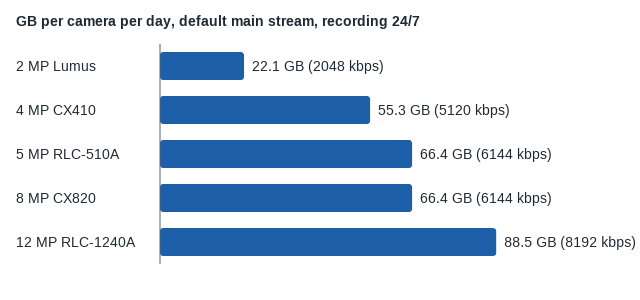
Bitrate is a setting with a published range, not a fixed property of resolution. Reolink’s spec pages show defaults that rise with sensor size, though not in step: the 5 MP RLC-510A and the 8 MP CX820 share the same 6,144 kbps default.
| Camera class | Default main stream | GB per day, main stream only |
|---|---|---|
| 2 MP (Reolink Lumus) | 2,048 kbps | 22.1 |
| 4 MP (CX410) | 5,120 kbps | 55.3 |
| 5 MP (RLC-510A) | 6,144 kbps | 66.4 |
| 8 MP / 4K (CX820) | 6,144 kbps | 66.4 |
| 12 MP (RLC-1240A) | 8,192 kbps | 88.5 |
These are one manufacturer and one model per class: examples, not a market average. Use your own camera’s stream settings when you can.
Codec: H.264, H.265 and H.265+
Reolink says H.265 gives significantly better compression than H.264, and that H.265+ can lower bitrate by about 50% to 60% compared with H.265 under typical conditions, depending on the scene. Neither claim comes with a single fixed saving for plain H.265, so measure the bitrate your camera reports after switching and use that. H.264 remains the most widely supported codec, so check that your viewing apps can decode H.265 first.
Motion recording versus continuous
Motion-based recording stores more days than 24/7 recording on the same drive, according to Reolink, with no percentage given. Treat the share of the day with activity as your own estimate. A quiet side yard may be active a few percent of the day; a front door facing a street will be much busier.
Local drive versus cloud
Local storage is limited by drive capacity, so the formula decides how many days you keep. Cloud plans are priced by vendor and tier, usually by days of history or number of cameras, so check the plan itself. Our comparison of wired and wireless cameras covers NVR, microSD and cloud trade-offs.
Worked example: four cameras for 14 days
Four 5 MP cameras, main stream 6,144 kbps plus sub stream 256 kbps, recording nonstop.
- Bitrate per camera: 6,144 + 256 = 6,400 kbps.
- GB per camera per day: 6,400 × 0.0108 = 69.1 GB.
- All four cameras per day: 69.1 × 4 = 276.5 GB.
- Fourteen days: 276.5 × 14 = 3,870 GB, about 3.9 TB.
A 4 TB drive just holds this, so buy larger for headroom. If the cameras recorded only 25% of the day, the same setup needs about 0.97 TB. The 25% is an illustration, not a manufacturer figure.
Check your plan against the surveillance guide
If you are still choosing hardware, see our surveillance camera picks. If you want cameras that join a wider smart home, our Matter device lookup shows which device types each platform lists, and says plainly when none lists cameras.
Common questions
How much storage does one security camera use per day?
It depends on the bitrate you set, not only the resolution. At Reolink's default main-stream bitrates, a 2 MP camera at 2,048 kbps writes about 22 GB per day and an 8 MP camera at 6,144 kbps writes about 66 GB per day, in both cases recording nonstop and counting the main stream only. Add the sub stream if your recorder stores it.
How many TB do I need for 4 cameras for 30 days?
Four 5 MP cameras at a 6,144 kbps main stream and 256 kbps sub stream write about 69 GB per camera per day, or about 277 GB per day for all four. Over 30 days that is roughly 8.3 TB of continuous footage. At a 25% recording share it falls to about 2.1 TB. These use decimal terabytes, the unit drives are sold in.
Does H.265 use half the storage of H.264?
Not as a fixed rule. Reolink says H.265 gives significantly better compression than H.264 but publishes no percentage for plain H.265. It says H.265+ can cut bitrate by about 50% to 60% compared with H.265 under typical conditions, depending on the scene. Check the bitrate your camera actually reports after you change the codec, and plan from that number.
Should I record continuously or only on motion?
Motion-only recording stores more days on the same drive, which Reolink confirms but without a percentage, because the saving depends on how busy the scene is. Continuous recording gives an unbroken record and a predictable storage figure. A busy street can make motion recording nearly as large as continuous. Estimate the share of the day with activity, then use that share in the formula.
Is cloud or a local NVR cheaper for storage?
A local NVR has a one-time drive cost and no monthly fee, while cloud storage is a recurring fee that varies by vendor and plan. Our wired vs wireless comparison sets the two side by side. Because cloud plans usually cap days or clips rather than gigabytes, the bitrate formula matters most for local drives and microSD cards, where capacity is the limit.
What bitrate does a 4K camera use?
It varies by model and setting. On the Reolink pages we checked, the 8 MP (4K) CX820 has a main stream of 1,024 to 8,192 kbps with a 6,144 kbps default. Your camera's stream settings screen shows the live figure, and that number should replace any default in the formula.
What we checked
- Reolink Support, How Long Can Reolink NVR Record for (formula, main and sub stream, motion recording) (support.reolink.com)
- Reolink Support, How to Set Up Reolink Encoding Format (H.264, H.265, H.265+) (support.reolink.com)
- Reolink Business, RLC-1240A specifications (12 MP, main stream 1,024-10,240 kbps, default 8,192) (business.reolink.com)
- Reolink Business, CX820 specifications (8 MP, main stream 1,024-8,192 kbps, default 6,144) (business.reolink.com)
- Reolink Business, RLC-510A specifications (5 MP, main stream default 6,144, sub stream default 256) (business.reolink.com)
You might also like
- Smart Security Systems: Complete Guide to Protecting Your Home
Learn how smart security systems work, which sensors and cameras to choose, local vs. cloud storage trade-offs, monitoring costs, and setup steps.
- Best Surveillance Cameras for Automated Home Security
Compare top home security cameras across 4K PoE, solar wire-free, budget Wi-Fi, and smart hub models with verified specs, storage, and automation.
- Wired vs. Wireless Home Security Cameras: Reliability and Storage Compared
Compare wired PoE and wireless security cameras on power reliability, Wi-Fi bandwidth, 24/7 vs. motion recording, local NVR vs. cloud storage, and setup.
- Smart Home Security Systems: Features That Actually Matter
Compare smart home security system features that matter: cellular and battery backup, sensors, local storage, Matter support, and monitoring plans.